Friday, November 5, 2010

How Windows Server is like the Dallas Cowboys

Without going into too much detail, a question came up about how our users access our tools.  Most of our centralized tool infrastructure is based on a web/app or app server on Windows Server 2008 R2 machines and our databases are on either Windows Server/SQL Server or AIX/Oracle configurations.  A question came up about licensing and we usually license by processor for any of the 3rd party tools because we have a variable number of users hitting our applications and it is usually in the thousands.

During the conversation, the topic of Windows Server Client Access License (CAL) came up.  I told them I didn't think my users needed them (even though we have them) because my users don't access the server, just the app through either JBoss or IIS.  Oh, but I was wrong.  According to the Microsoft license specialist (I deleted the references to our company and bolding is mine):

  • If the Windows Server is a server for internal use, every user/device that accesses the server directly or indirectly needs a Windows CAL.
  • If the Windows Servers are used by external users, you need External Connectors.  External users are defined as users who are not employees or onsite contractors.
  • If the Windows Server is hosted by someone else, the server needs to be properly licensed by the Hoster 

So how is Windows Server like the Dallas Cowboys or New York Yankees/ Mets /Giants /Jets or any other sports franchise trying to invent ways to get more money out of their stadium?  Because according to the stipulations above, Windows Server is the equivalent of a Personal Seat License (PSL) to house your application.

A computer is useless unless it has an operating system (well not totally useless, you could use it as a door stop), so you pay to put an OS like Windows Server on your web/app or database box and then install your app or database on top of that.  But according to the stipulations above, the end-users has to pay for a CAL (or ticket) to access the application even if they don't access the web/app or database box itself.  So even though we bought a server license (PSL), we still need a CAL (ticket) to use our application because the user is indirectly accessing the OS.

So why would I buy a Personal Seat (or Server OS) that I couldn't use unless I bought a ticket (or CAL)?  Because people like Jerry Jones think of these things (I hope you don't win another game Cowboys!)

Friday, October 22, 2010

Open Source Scanning Tool Eval

One of the risk areas for ISVs and others who make software for use outside of their company is the inclusion of open source packages in their software and the license obligations associated with those packages.  Most of our R&D groups have a pretty good handle on what open source packages they are using, however, our legal department and R&D management felt it would behoove us to have a scanning tool in order to verify everything included in our code.  So, with that in mind, the governance board kicked the tool evaluation over to my group and asked us to get an open source scanning tool.

Players


We found only a couple of players in the open source scanning space, BlackDuck, Palamida and OpenLogic.  There are a couple of other supporting groups like Veracode (they are mostly for security), Protecode (the engine used by OpenLogic), and  FOSSology (a community that develops a package to analyze code for open source software), but our evaluation stuck pretty much to BlackDuck, Palamida and Open Logic.


Overall, BlackDuck is the front runner in the field.  Gartner, Forrester and the like all recognize BlackDuck as having the largest structure, customer base and offerings of the three.  Palamida labels themselves as "application security for open source software", but their sales person dismisses the security talk and concentrate their message about their scanning capabilities.  OpenLogic is pretty small, but they have a decent scanning tool and a hosted offering to upload a fingerprint to analyze and then review the results.


Requirements


The requirements we looked at were:

  1. Ability to review source code and binaries
  2. Understand license obligations
  3.  Provide software inventory (bill of materials)
  4. Comprehensive library
  5. Multi-user/Multi-role system
  6. Common IDE interface
  7. Report generation
  8. Installation ease 
  9. Ease of use
  10. File comparison feature
  11. Performance
  12. Automation
  13. Cryptography
Stakeholders
  1. The following groups participated in the requirement gathering process and product evaluations:
    1. Legal
    2. Open Source Policy Subcommittee
    3. Open Source Risk Assessment Subcommittee
    4. IT Risk Management/GA Audit
    5. Business Unit R&D Leadership
Outcomes


We did a POC with BlackDuck, Palamida and OpenLogic.  We used the same code package and gave each vendor a week to do the scan, reconcile the findings and do a presentation of their findings.  Both BlackDuck and Palamida came onsite to do their scans, while OpenLogic did theirs remotely.  Palamida brought their own box while BlackDuck had us install their software on a virtual machine in our development center.

All the scans came back with pretty much the same results and luckily our code didn't have any major violations.  We compared the found list and there were small variations in the number of exact hits, but between the exact matches and partials, each tool did a similar job of finding the open source components in our code.

All three vendors warned us about the large effort to analyze the scan after it was done and based on their results and presentation, they do have a point.  All three had delta scan ability, so the initial scan would have the majority of the work, but once a baseline was set, then later scans would be easier.

This may have been just our thinking, but it appeared to us BlackDuck and Palamida were trying to bundle their scanning software with their analysis service and when we tried to divorce the software from the service, the price of the software rose.  Also, the environment overhead for BlackDuck and Palamida was not overly large, but because OpenLogic was a hosted solution, the two were large in comparison.

Each of the tools had a customizable workflow engine, with BlackDuck and Palamida having a fairly robust offering compared to OpenLogic (Palamida's later release had the better workflow engine).  The policies and policy rules were the most important to us and all of them had that ability.

Decision


At the end of the day, we decided to go with OpenLogic.  During the evaluation, we found pretty quickly that what we wanted was just a scanning tool to tell us what open source components were included.  We were not at the point to deal with a robust workflow engine with submission and approval workflows.  Nor, did we need a comprehensive library to store all our code as well as open source code our groups were using.  Also, we already have architects, configuration managers and enough engineering staff to be able to compare code snippets, so we didn't really need the analysis.  When OpenLogic came in with a reasonable price and an option for just the things were looking for, we decided they were the one to fit our needs.

I think BlackDuck and Palamida have a place in this space, but I'm not sure we as an organization were ready for what their strengths are.  We may be later, but for right now, we brought OpenLogic online and have done a scan and are happy with what we are seeing.  We will work with our Open Source Task Force to come up with a roll-out process and I'll update this blog when we progress down this path with any challenges and findings we have.

Thursday, October 14, 2010

Translate Feature in Outlook 2010

We have a group in France who uses our tools, so periodically I have e-mail exchanges with their QA manager.  She speaks English very well, so there is not a need for me to know French, but as a courtesy, I try to include as much as I know in French (Bonjour, Merci, etc...).

So, in Outlook 2010, I was intrigued to see the Translate feature off the Review tools.  This isn't a bad tool, and so far most of the messages I have sent have been understood (not sure they are correct, but she has understood the meaning).


The translation isn't native to Outlook, but exports the word or text to an external Microsoft site to translate.  It has the ubiquitous pop-up saying you are transmitting data to an external site, so I wouldn't do it for anything confidential, but the site is pretty quick and as said, fairly accurate.

This is really helpful when receiving a message in another language, because the tool will translate it so you can read the message.  The issue is when you are trying to write something and use the translation tool to convert it to the receivers language, when you copy the converted text, it highlights it in this baby-puke yellow and you can't format it out in Outlook.  The reason it is highlighted is the translation tool displays a pop-up showing you the original text, so I understand why it is there, I just wish you could format it out.

Overall, it is a pretty neat feature and a nice addition.  Now if it could translate texting from my pre-teen, I would be jamming.

Wednesday, October 6, 2010

More on Security Development Lifecycle

In a previous blog, I talked about the methodologies and maturity for a security development lifecycle (SDL).  This is only one piece of the SDL program, and it takes people, process and technology to implement a SDL.  When we looked at these aspects, we tried to come up with a staged approach so we could implement security in our development process but in a way that didn't overrun people.

People
On the people front, we looked at the number of people and their roles for a centralized SDL team.  We quickly found we needed:

  • 1-2 FTE for 1 yr to write the process and training materials
  • 1 FTE for training coordinator
  • 1 FTE for security tool administration (1/2 FTE for admin, 1/2 FTE for BA)
  • Security buddies (Microsoft term) to help R&D groups take ownership of SDL in their business units
Because of that last one, we knew we needed to have more help from the business units and this would take a lot more people.  We also saw, that as we added business units, this could increase the number of people in the central roles, so we would assess our work as business units came on board.

Process
For process, it was defining what security means in each of the stages of the software development lifecycle.  The things we looked at for the major points of the lifecycle include:

  • Requirements
    • Include security non-functional requirement documentation that cover:
      • access controls
      • deployment consideration
      • authentication
      • authorization
      • input validation
      • logging & auditing
      • error handling
  • Design
    • Threat model the design
      • Include trained business unit security liaisons (BUSL) and whoever wrote the security non-functional specification
  • Development
    • Perform security checkpoint reviews after agreed upon code completion time
    • Security review reports
    • Static code analysis with training best practice
  • Testing
    • Dynamic code analysis with training best practice
  • Deployment
    • Determine how corporate security is integrated or help external customers with their application security checks
Technology
We have static and dynamic security testing tools, so it was a matter of rolling those out to all the business units and providing a central offering for those without the expertise.  This was probably the easiest of the pieces to tackle only because of what we currently have.

Deployment
To deploy this in a phased approach, we looked at the tasks for people, process and technology and grouped them into what we could accomplish without too much disruption.  With that, we came up with this model to help us plan our work.

*STRIDE approach is the Microsoft approach to threat modeling using Spoofing, Tampering, Repudiation, Information disclosure, Denial of service and Elevation of privilege.

How did it go
So how did it go after we planned all this?  Most of the items are being rolled out but I'm not sure it is as coordinated as I would do it.  Being in the tool business, my main focus was on technology and we have the static and dynamic code analysis tools in place, but we are assessing their value and determining if we need to replace or promote the tools.  I feel pretty comfortable in our space, and I'm sure the development groups are getting more comfortable putting SDL practices in place with their work.

Thursday, September 23, 2010

Security Development Lifecycle

I was reviewing my notes for a presentation I gave last year outlining a Security Development Lifecycle (SDL).  A SDL is more than just security scanning or dynamic/static analysis tools (being a tool guy, I usually only care about those things), but I found it interesting and tried to lay out how best to incorporate security in the Software Development Lifecycle (SDLC).

A SDL means something different to each organizations.  For a company like Microsoft, the SDL is a very comprehensive framework with many checks and gates and for good reason.  Their software is the biggest and used by the most people and they are constantly under attack.  For others, it doesn't need to be that extensive and just incorporate best practices and some checks.  We fall somewhere in between, so I decided to come up with the basic framework of a SDL, look at the different methodologies and then apply a maturity rating for our applications to determine how extensive we would be for the tasks in the model.

Basic Framework


The basic framework of a SDL is composed of seven distinct processes that run in parallel with the SDLC:

  1. Training
  2. Requirements
  3. Design
  4. Implementation
  5. Verification
  6. Release
  7. Response
Each process has security specific component to it even though they are consistent with other activities in the SDLC.


Methodologies

While there may be other methodologies, I really only looked at a couple:

  1. Open SAMM - this was probably the best of the ones I looked at because it is an open framework to help you put security into software development, without being overly prescriptive.
  2. Microsoft SDL - this is the most comprehensive, but it is still a framework and can be adaptable depending on your needs.  The tough part is once adapted to fit your work, you keep going back and trying to add the other processes, which then gets it back to the original.
There are various degrees of what will be done for all of those models, so to determine what tasks we would do for a particular application, we do a maturity evaluation of the application.

Maturity

We came up with a questionnaire to assess an application and give it a maturity level, based on answers for exposure, patient data, architecture and other criteria.  I kept the maturity levels to four:
  1. Low risk - internally developed or use, no personal or company information, not web-enabled
  2. Medium risk - web-enabled internal use, with some private information (Intranet)
  3. High risk - web-enabled external use with private but not sensitive information (Quality Center)
  4. Critical - web enabled external use with sensitive information (customer portal)
In another post, I'll write about how to put the people, process and technology into the SDL.

Wednesday, September 15, 2010

Outlook 2010

I have an MSDN subscription and decided to check out Office 2010 to see if there are any neat features in it.  So far I haven't been too impressed, but I did find a couple of improvements in Outlook that are pretty cool.

1.  I use the Unread Mail view in Outlook to keep up with new messages and when I opened it up this morning, I was surprised to see the messages grouped by folder.  This is pretty cool, because I have a bunch of rules setup and move messages to different folders trying to keep my inbox as clean as possible (currently at 6, but I'll take care of that this morning).  I don't remember this in 2007 (and I'm sure someone will tell me I could have changed my view... okay, I didn't think about it), but it is definitely helpful and better way of arranging my new messages.


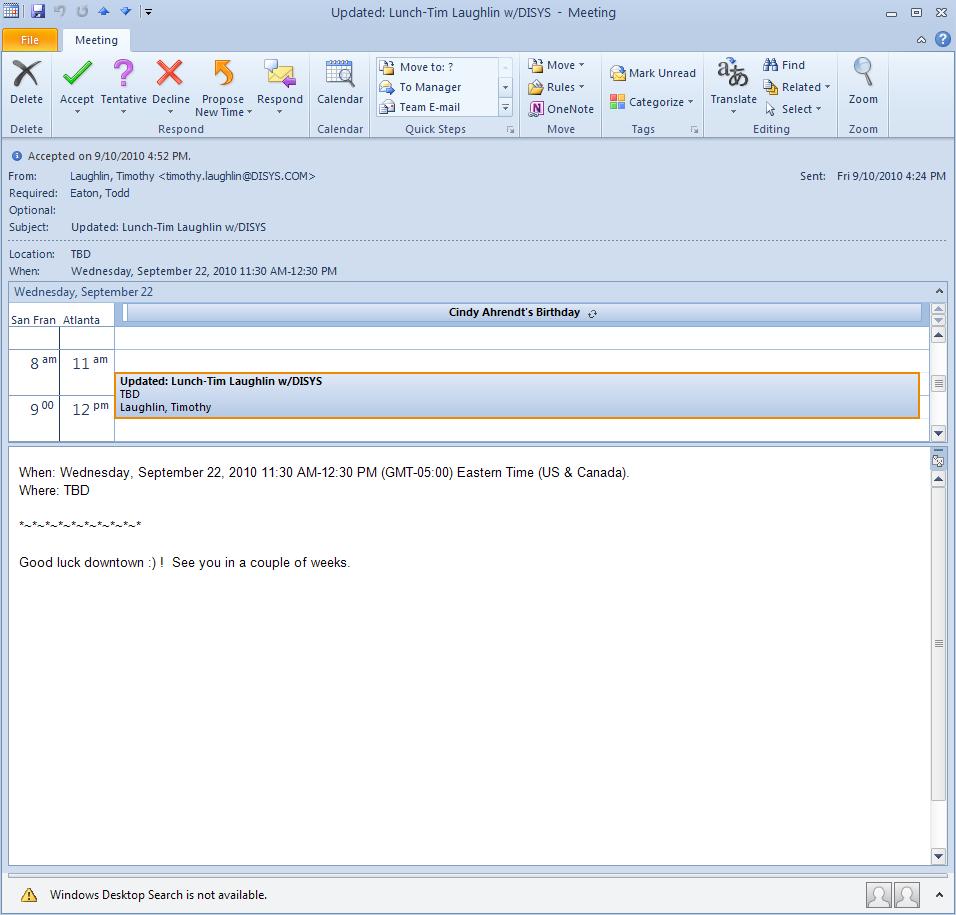
2.  The coolest thing I saw so far in Outlook is you get a mini calendar view whenever you open an appointment request.  This one I actually showed to people in the office, so it did impress me.


I was always going back and forth between my appointment request and my calendar to see the conflicts or whatever is next to the time, so this is really helpful.

Another feature I did see, but haven't played with it yet, is you can group messages by conversation.  I keep a pretty clean mailbox and use Google desktop search if I'm looking for archive conversations, so I don't really see a need, but I'll check it out to see if it adds any value.  I think they stole this from Google, because I use it quite a bit with my gmail account, but my home e-mail is not as clean as my work.

Of course, with every Microsoft update, they did let a couple of escapes (defects found after GA) out the door.  The most annoying to me is I lost the 'online status next to the name' feature.  There is actually an option for this in the options menu, but it is checked and grayed out.  So even though it is checked, I don't see the Office Communicator online status next to the name in my messages.  Not a big deal, but something I liked and with it gone, annoys me. <9/16 - I applied the June and August cumulative updates for Office 2010 and the lastest OC 2007 R2 patches and this morning my OC status showed in my address list again.  They must have fixed something.>

The other thing is when I upgraded, it changed the tool bar order and I had to manually move my tool groups (btw... I'm not a big fan of the 2007/2010 tool bar... I think they are way too big and clunky).  Once again, not a big deal, but annoying.

Overall, I haven't seen the big splash I would expect from a major release, but I'll keep plunking away.  I think for Outlook, they are trying to integrate it more with social media, but I only use Outlook for work and stick to gmail for my personal stuff, so I don't see the need.  Hopefully I'll find something that makes me go Wow!, but for now, it is a nice to have, but nothing really special.

Monday, September 13, 2010

Testing Terminology

Every now and again, I'll read something expecting one thing and after going through the article, determining the author is describing a related topic, but different enough to question if it is me or the author mixing up terminology.

The latest example I found is in the August issue of Healthcare Informatics, a monthly magazine about the healthcare information systems industry targeted to CIOs.  In the Clinical Update section, the Editor-in-Chief (kind of a lofty title), Mark Hagland, wrote about a Leapfrog Group CPOE (computerized patient order-entry) study with a subtitle of "Leapfrog Leaders Discuss CPOE Performance-Testing Results".  When reading this subtitle, I immediately thought I would read about average transaction times against plan or other performance testing SLA reporting.  Instead, the article discussed their findings of medication orders not triggering appropriate warnings or alerts, which is more an integration test rather than a performance test.  I understand in the IT or software world, testing terminology is not consistent and terms are used interchangeably to mean various things (i.e. Quality Assurance vs. Quality Control or testing), but in my opinion, mixing up a common term like performance testing with an obvious integration test, brings into question the whole study.

I can't really blame Mr. Hagland, because in the article, the Leapfrog CEO, Leah Binder, is paraphrased to say "... every hospital implementing a CPOE system needs to test and retest its system's performance, in order to ensure that is is actually averting medication and other orders", so Mr. Hagland is just reiterating what the Leapfrog group is selling.  But you would think a publication with "Informatics" in its title, would understand common testing terminology a bit better.

With that in mind, one of the first things we did when rolling out our testing methodology was to get a standard glossary in place, so we all used the same terms.  We had 78 different testing terms and came up with a common definition for all of them.  It only took us about 4 weeks (yikes, that was a painful month), but it was worth it, because when we got to the point of describing what tests to run when, we all knew the difference between a performance test (testing to confirm a system meets performance goals such as response time, load or volume) and an integration test (a test of a combination or sub-assembly of selected components in an overall system).